

OnPrintShop Announces Version 13.1, Advancing AI-Powered Design and Print Workflow Automation
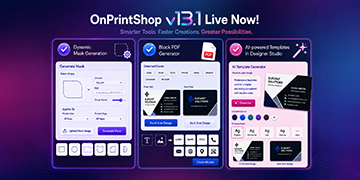
OnPrintShop launches Version 13.1 with AI design tools, dynamic masks, flexible product setup, and workflow upgrades to streamline print operations.
AHMEDABAD, GUJARAT, INDIA, September 15, 2026 /EINPresswire.com/ -- OnPrintShop, the award-winning AI-powered web-to-print solution, has announced the successful release of Version 13.1, introducing new capabilities across designer studio, the storefront, and admin panel.
The latest version builds on OnPrintShop's continued focus on AI, automation, and operational efficiency, bringing new tools that help print service providers reduce manual work, accelerate design creation, and manage everyday print workflows more effectively.
Version 13.1 combines new AI-driven capabilities with practical improvements across product management, order processing, quoting, customer access, content management, and shopping feed integration.
AI-Powered Tools Accelerate Design Creation
One of the key highlights of Version 13.1 is the expansion of design automation capabilities within OnPrintShop.
The new AI-powered templates in designer studio allow users to generate design templates by providing clear prompts. By turning design requirements into editable starting points, the feature can reduce the time and effort required to create templates for different print products and customer needs.
The release also introduces dynamic mask generation, enabling users to create product masks directly within the application. Users can select a shape and configure the required mask details, while the existing option to upload prepared mask images remains available.
Another addition, the block PDF generator, allows users to create individual design blocks directly from PDF artwork. The system identifies text and image elements within the PDF, helping users convert existing artwork into reusable blocks without relying on adobe acrobat or additional plugins.
Together, these capabilities make it easier for print businesses to create, adapt, and manage design assets within their web-to-print environment.
Streamlined Order Management and Customer Workflows
Version 13.1 also introduces enhancements designed to improve visibility and speed across order processing.
A dedicated rush order indicator enables administrators to identify priority jobs at a glance. This helps teams quickly distinguish urgent orders from standard jobs and prioritize processing accordingly.
The update also simplifies customer-specific design creation during order modifications. Administrators can create new customer designs or versions directly from the order modify page using designer studio. The resulting template is automatically saved and assigned to the relevant order, reducing the need to switch between different areas of the platform.
These enhancements help connect design and order management more closely, supporting faster responses when customers require changes to an existing order.
Simplified Product Configuration
Managing multiple product configurations has also become easier with Version 13.1.
Print businesses can now manage standard and die-cut configurations within a single product, eliminating the need to create separate products for each configuration. This reduces duplicate product setup and maintenance while giving businesses more flexibility when presenting product options to customers.
The improvement can be particularly useful for print businesses offering products with different cutting or shape requirements, allowing them to consolidate related configurations within their product catalog.
More Flexible Customer Access and Storefront Management
Version 13.1 expands customer account options by enabling phone-based signup and login. Customers can use their phone numbers as an alternative to email-based account access, creating a more convenient authentication experience.
The release also strengthens storefront content management through an enhanced CMS experience. Administrators can create responsive CMS pages using drag-and-drop Bootstrap layouts, content blocks, styling tools, and device previews, without requiring HTML or CSS development.
This gives businesses greater control over storefront content while making responsive page creation more accessible to non-technical teams.
Improved Image Editing and Quote Management
The latest update also adds practical tools for managing images and quotes.
Users can now edit uploaded images directly within the platform using crop, rotate, flip, and zoom capabilities. The original image remains unchanged, while the edited version is saved separately as a new image, allowing businesses to prepare assets without affecting their source files.
Quote management has also been improved. Incomplete quotes can now be saved as drafts, allowing users to return to them later. The partial quote experience has also received UI improvements for reviewing and ordering approved items.
For customers using the Price Calculator, Version 13.1 introduces greater flexibility in quantity selection. Alongside predefined quantities, users can select the new ‘Other’ option to enter a custom quantity.
Expanded Shopping Feed Support
Version 13.1 also expands product distribution capabilities by allowing administrators to include 4over products in Google and Facebook Shopping Feeds.
The system automatically identifies valid product combinations based on selected options and includes only supported combinations in the feeds. This simplifies feed management while helping print businesses promote eligible 4over products through external shopping channels.
Continuing OnPrintShop's Focus on Smarter Print Operations
The release of Version 13.1 represents another step in OnPrintShop's ongoing effort to combine AI-powered capabilities with practical automation for print businesses.
Rather than focusing solely on new technology, the update addresses several everyday challenges faced by print service providers, from creating design assets and managing product configurations to handling urgent orders, preparing quotes, and maintaining storefront content.
According to Naresh Devra, Vice President of Product Development at OnPrintShop, the latest release reflects the company's focus on making advanced capabilities more practical for print businesses.
“Version 13.1 brings AI and automation closer to everyday print workflows. By simplifying design creation, product management, and order processing, we are helping businesses reduce manual effort while giving their teams more flexibility and control.”
Naimish Patel, Vice President of Sales at OnPrintShop, added that the update addresses evolving customer expectations for faster and more convenient digital print experiences.
“Print businesses need technology that can keep pace with both operational demands and customer expectations. Version 13.1 introduces enhancements that make key workflows simpler, faster, and more adaptable, helping businesses deliver a smoother ordering experience.”
In addition to the new features and enhancements, OnPrintShop has resolved identified bugs to improve platform performance, stability, and overall user experience.
With Version 13.1 now available, OnPrintShop continues to advance its AI-powered web-to-print platform with capabilities designed around efficiency, flexibility, and scalable digital print operations.
Print businesses interested in exploring the latest capabilities can book a live demo with OnPrintShop to see how Version 13.1 can support their digital print workflows.
Original PR Source: https://www.prnob.com/release/show/onprintshop-announces-version-131-advancing-ai-powered-design-and-print-workflow-automation/490823
Naimish Patel
Onprintshop Software Private Limited
+91 79 3520 0685
marketing@onprintshop.com
Visit us on social media:
LinkedIn
Facebook
X
Legal Disclaimer:
EIN Presswire provides this news content "as is" without warranty of any kind. We do not accept any responsibility or liability for the accuracy, content, images, videos, licenses, completeness, legality, or reliability of the information contained in this article. If you have any complaints or copyright issues related to this article, kindly contact the author above.
